
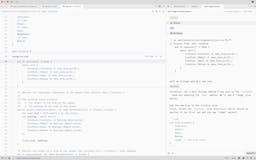
Discover Zed- The High-Performance Multiplayer Code Editor
In the fast-paced world of software development, the tools we use can significantly impact our productivity and collaboration. One of the latest innovations in this space is Zed, a high-performance, multiplayer code editor developed by the creators of Atom and Tree-sitter. This article delves into what Zed is, its unique features, and how it stands out in the crowded landscape of code editors.
Understanding Zed
Zed is designed to cater to the needs of modern developers who require a robust and efficient coding environment. Unlike traditional code editors, Zed emphasizes real-time collaboration, allowing multiple users to work on the same codebase simultaneously. This feature is particularly beneficial for teams that are distributed across different locations, enabling seamless communication and collaboration.
Key Features of Zed
- Multiplayer Editing: Zed allows multiple developers to edit the same file in real-time, making it easier to collaborate on projects without the need for constant back-and-forth communication.
- High Performance: Built with performance in mind, Zed is optimized for speed and responsiveness, ensuring that developers can work efficiently without lag or delays.
- Intelligent Code Assistance: Leveraging the capabilities of Tree-sitter, Zed provides intelligent code suggestions and syntax highlighting, enhancing the coding experience.
- Customizable Interface: Users can tailor the Zed interface to their preferences, allowing for a personalized coding environment that suits their workflow.
How Zed Enhances the Development Experience
Zed is not just another code editor; it is a tool designed to enhance the overall development experience. Here’s how it achieves this:
Real-Time Collaboration
In today’s remote work environment, collaboration is more important than ever. Zed’s multiplayer editing feature allows developers to work together in real-time, making it easy to share ideas, troubleshoot issues, and implement changes on the fly. This collaborative approach can lead to faster project completion and improved code quality.
Streamlined Workflow
Zed’s high-performance architecture ensures that developers can focus on their work without interruptions. The editor is designed to handle large codebases efficiently, allowing users to navigate and edit files quickly. This streamlined workflow is essential for maintaining productivity, especially in fast-paced development environments.
Enhanced Learning Opportunities
For new developers, Zed offers a unique learning experience. The intelligent code assistance provided by Tree-sitter helps users understand coding best practices and syntax rules. As they code, they receive real-time feedback and suggestions, which can accelerate their learning process and improve their skills.
Cross-Platform Compatibility
Zed is designed to work across different platforms, making it accessible to a wide range of users. Whether you are on Windows, macOS, or Linux, Zed provides a consistent experience, allowing developers to switch between devices without losing functionality.
Why Choose Zed Over Other Code Editors?
While there are many code editors available, Zed stands out for several reasons:
Built by Experts
Zed is developed by the creators of Atom and Tree-sitter, two well-respected projects in the developer community. This expertise ensures that Zed is built on a solid foundation of knowledge and experience, resulting in a high-quality product.
Focus on Collaboration
Many code editors prioritize individual productivity, but Zed places a strong emphasis on collaboration. This focus on teamwork makes it an ideal choice for developers who work in teams or on open-source projects.
Continuous Improvement
Zed is designed to evolve with the needs of its users. The development team actively seeks feedback and implements updates based on user input, ensuring that the editor remains relevant and effective in a rapidly changing industry.
Getting Started with Zed
To start using Zed, follow these simple steps:
- Visit the Zed Website: Go to the official Zed website to learn more about the editor and its features.
- Download and Install: Download the appropriate version for your operating system and follow the installation instructions.
- Create an Account: Sign up for a Zed account to access multiplayer features and collaborate with others.
- Start Coding: Open Zed and begin your coding journey, taking advantage of the real-time collaboration and intelligent code assistance.
Frequently Asked Questions
What programming languages does Zed support?
Zed supports a variety of programming languages, including JavaScript, Python, Ruby, and more. Its intelligent code assistance is designed to enhance the coding experience across these languages.
Is Zed suitable for beginners?
Yes, Zed is user-friendly and offers features that can help beginners learn coding more effectively. The real-time suggestions and collaborative environment make it an excellent choice for new developers.
Can I use Zed for team projects?
Absolutely! Zed’s multiplayer editing feature is specifically designed for team collaboration, allowing multiple developers to work on the same project simultaneously.
How does Zed compare to other code editors?
Zed stands out due to its focus on real-time collaboration, high performance, and intelligent code assistance. While other editors may prioritize individual productivity, Zed emphasizes teamwork and communication.
Final Thoughts
Zed is a game-changer in the world of code editors, offering a high-performance, multiplayer environment that caters to the needs of modern developers. With its focus on collaboration, intelligent code assistance, and customizable interface, Zed is poised to become a favorite among teams and individual developers alike.
